See your sound

Ring out the room.
In seconds.

Real-time analyser, transfer function, SPL meter, and remote noise monitor. Native on Mac and iOS. Built by working live sound engineers.

Top 10 in Music on the Mac App Store Featured on ProSoundWeb
Get Spektral Mobile £9.99

For the Mac version (£29.99), visit spektral.app on your computer.

One-time purchase · No subscription · Backed by Apple’s refund policy

macOS 14.0 · iOS 17.0 or later

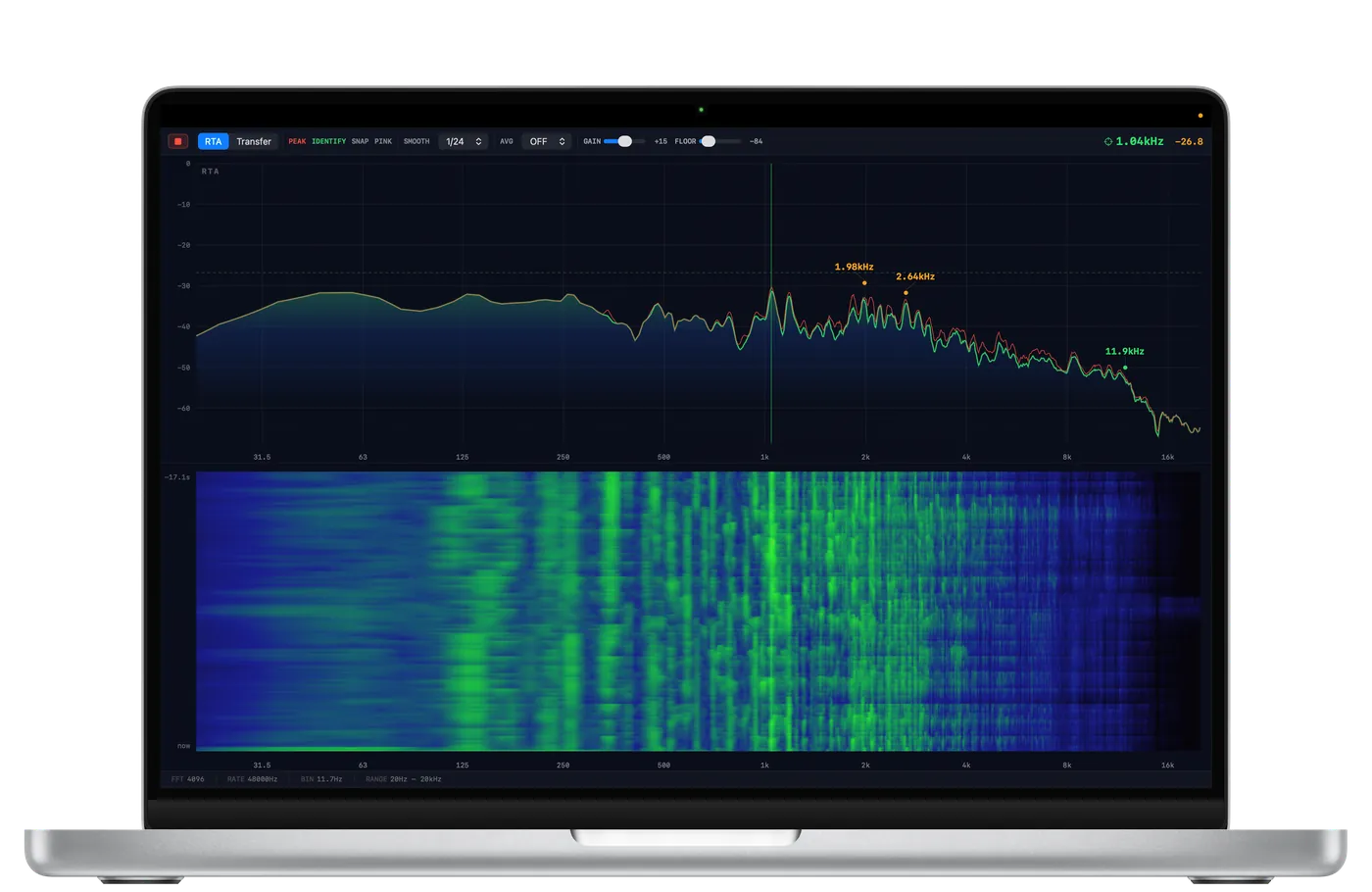
Spektral running on MacBook Pro showing real-time audio spectrum analysis

Just tried Auto Alignment and Auto EQ… and honestly, it absolutely nailed it first go. Even with the coherence quite low. Fab. Love it. Top work.

— Sound Engineer, UK

More testimonials coming soon.

Everything you need to ring out a room.

Spektral gives you the same analysis tools used in world-class live sound — in a native app that feels like Apple built it. On your Mac or in your pocket.

Real-Time Analyser

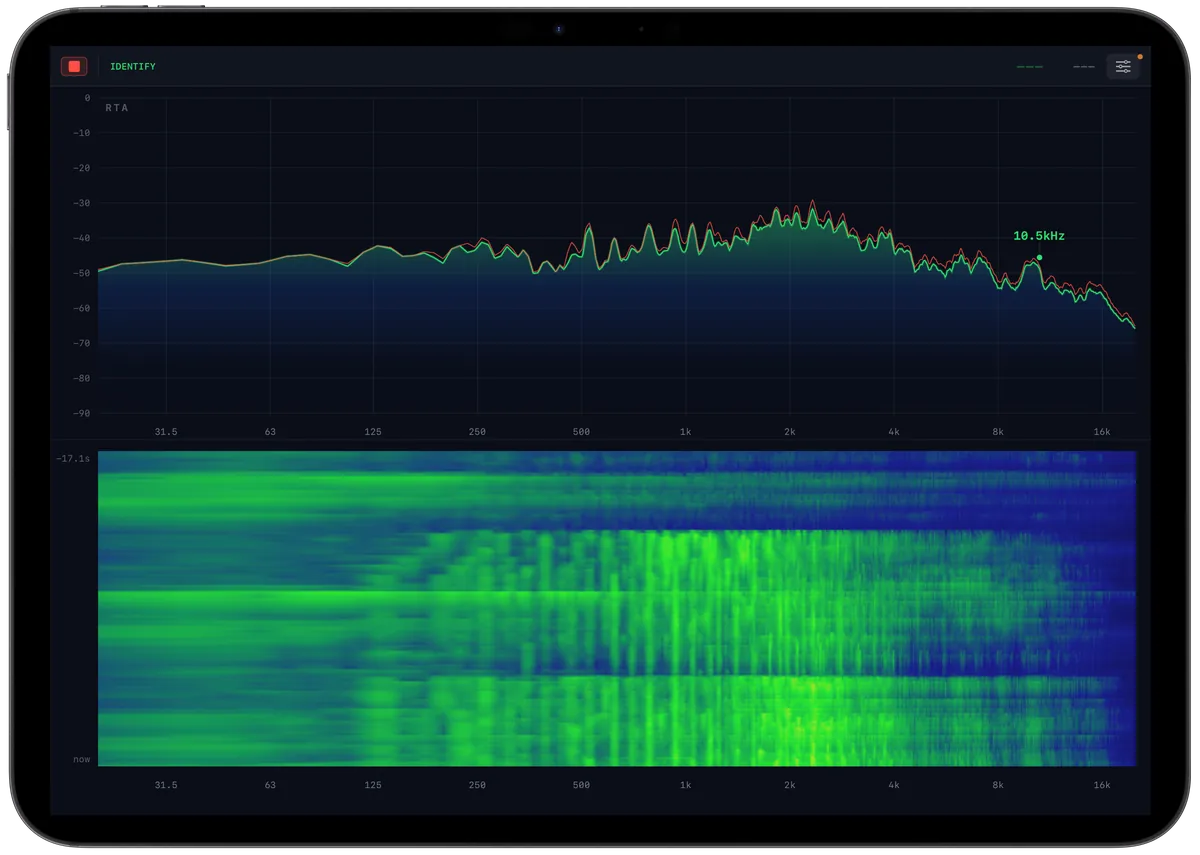
High-resolution RTA with 4096-point FFT at 48kHz. Logarithmic frequency scale from 20Hz to 20kHz with sub-bin accuracy via parabolic interpolation.

Spectrogram

Scrolling time-frequency heatmap with adjustable floor/ceiling range controls and scrollable history. Persistent bright lines reveal feedback frequencies at a glance.

Transfer Function

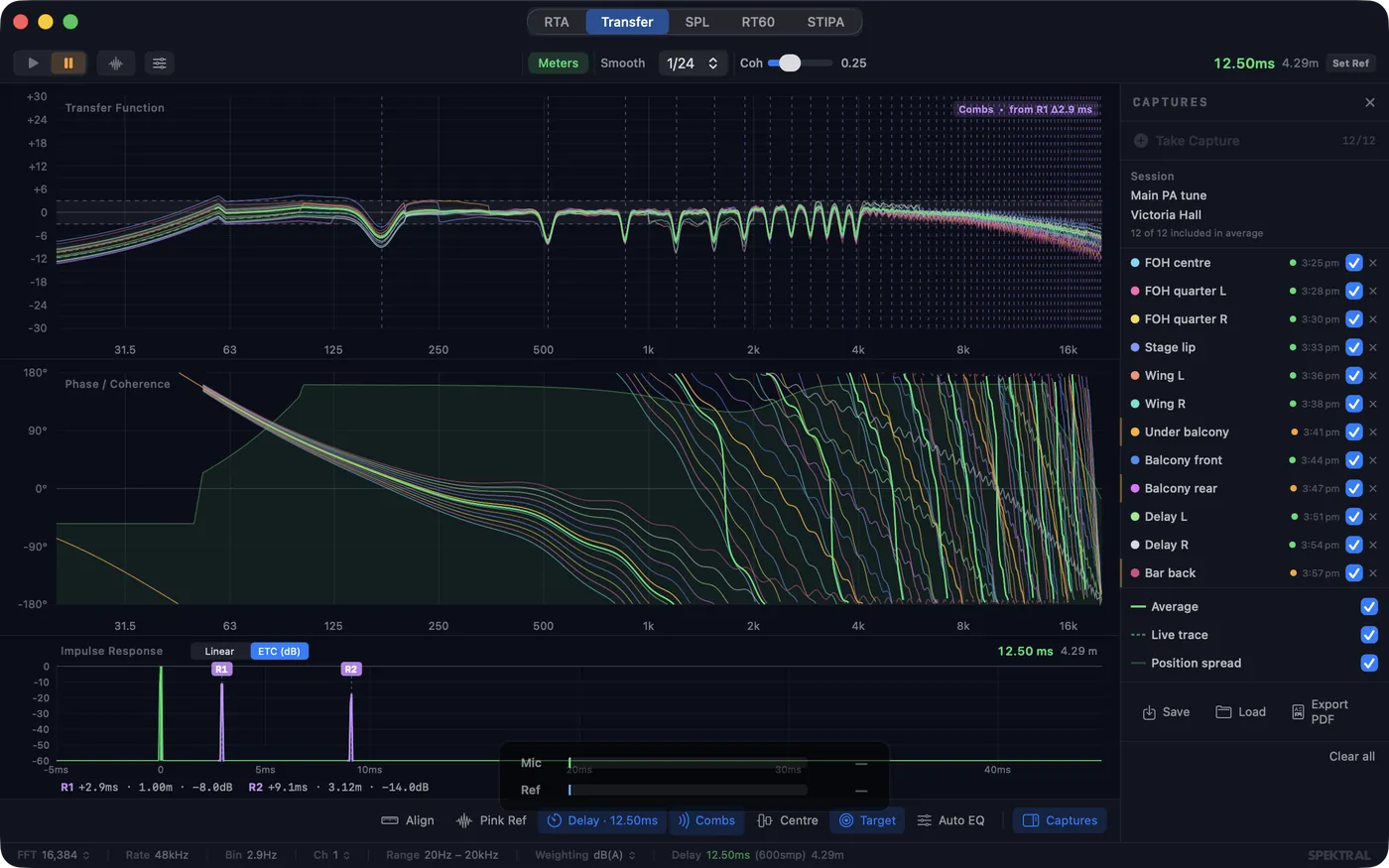
Dual-channel H1 estimator with magnitude, phase, and coherence. Impulse response view with ETC (log dB) display, auto-labelled reflections, and comb-filter prediction. Smart delay finder with manual override. Multi-position capture, delay alignment wizard, Auto-EQ, and PDF export.

Peak Identification

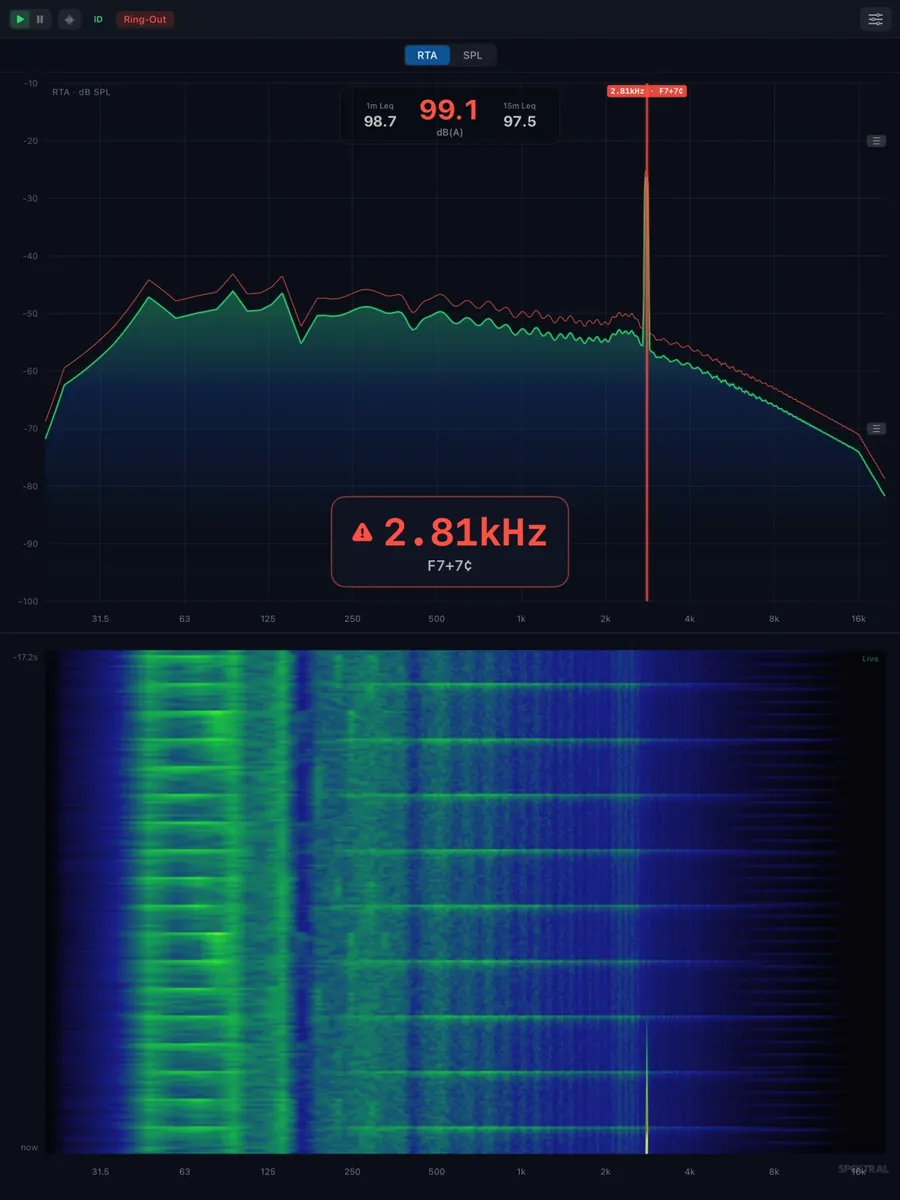
Automatic detection and labelling of spectral peaks with precise frequency readout. Find feedback frequencies at a glance — with optional musical note display.

Snapshot Compare

Freeze the current spectrum as a reference trace and compare against live audio. See exactly what changed after your EQ adjustments.

Pink Noise Generator

Built-in pink noise source with adjustable level. No external gear needed — excite the room directly from your Mac for quick system checks.

SPL Monitor (macOS)

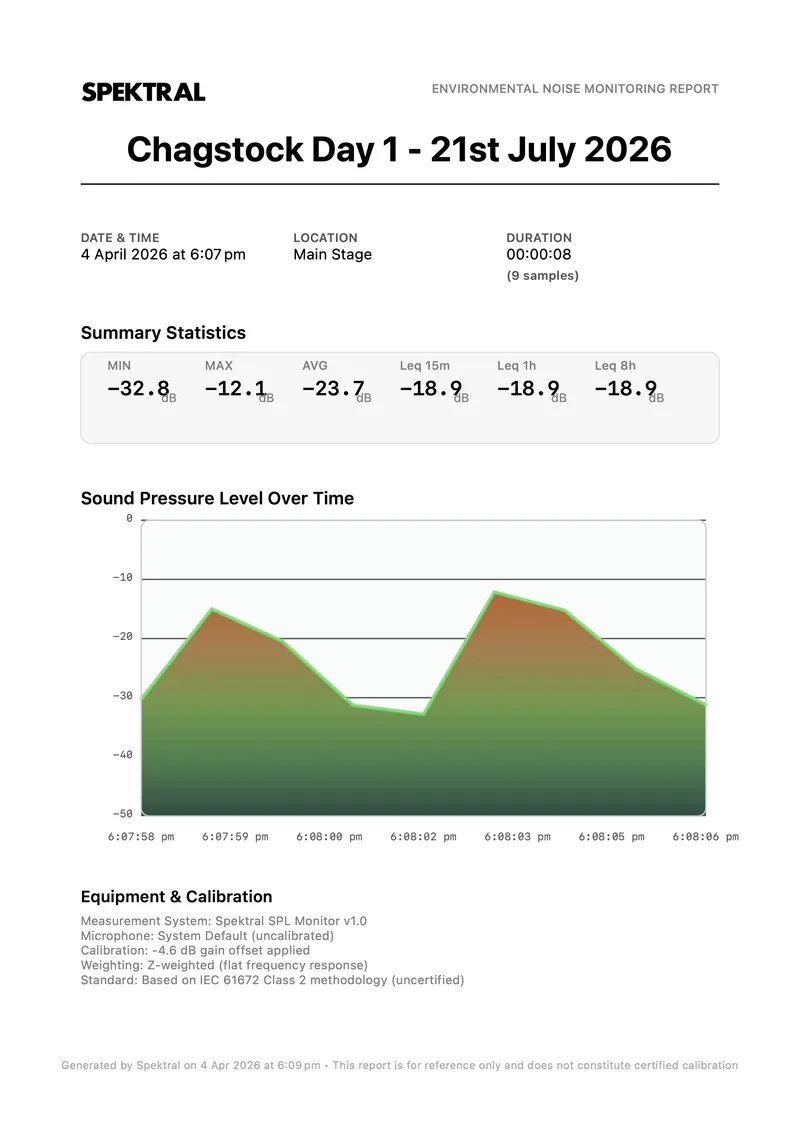
Environmental noise compliance with A/C/Z frequency weighting, Slow/Fast/Impulse time weighting, microphone calibration, live VU meter, Leq tracking (15min/1hr/8hr), and professional PDF export with equipment and calibration details.

RT60 Reverberation (macOS)

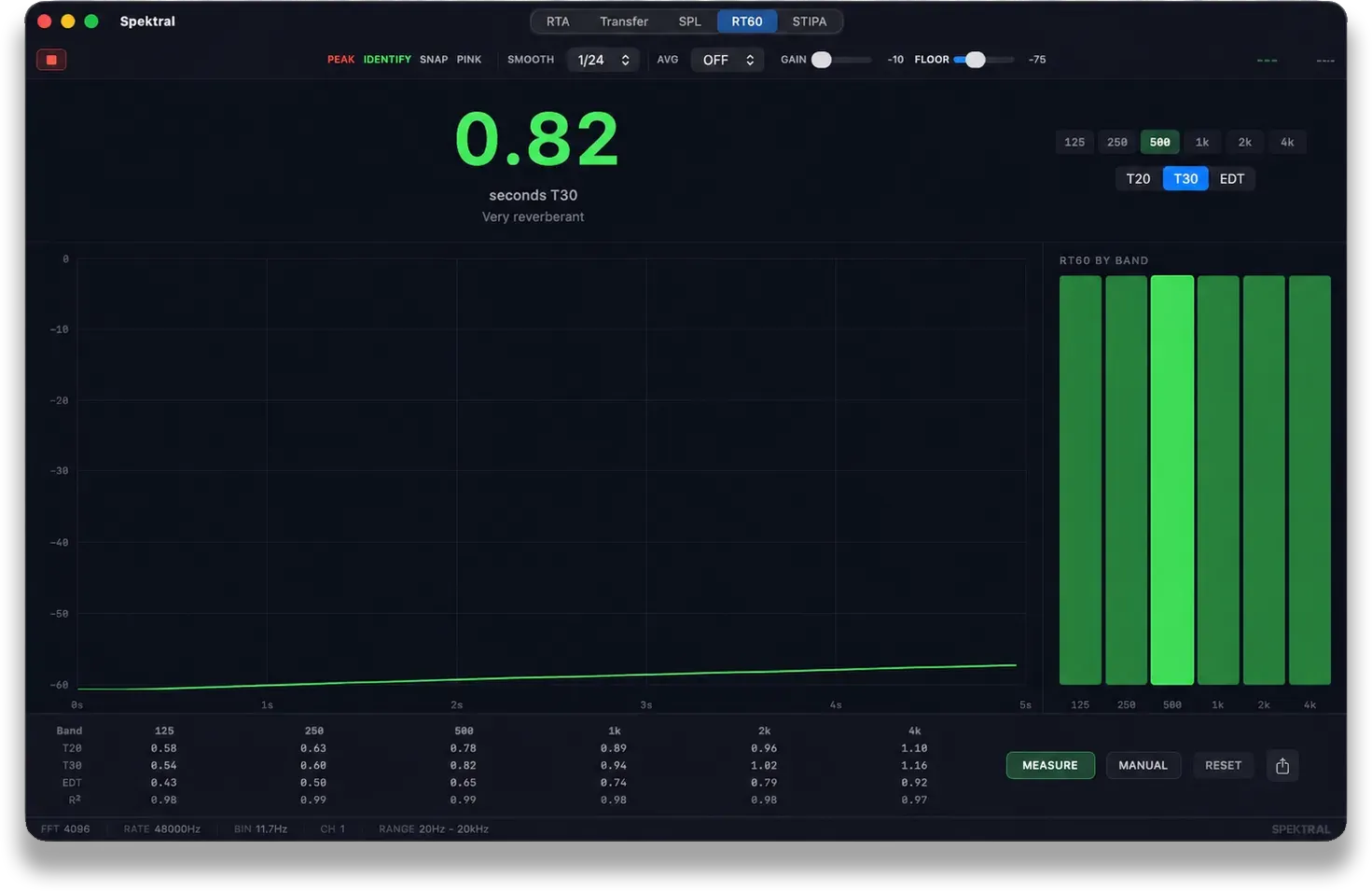
Schroeder-integration reverberation time across octave bands (125 Hz–4 kHz), with T20, T30, and EDT, per-band decay curves, and an R² goodness-of-fit on every measurement. For room tuning, treatment verification, and commissioning.

STIPA Intelligibility (macOS)

Speech Transmission Index to IEC 60268-16 — an STI score with Bad–Excellent rating, per-band modulation transfer (MTF) and signal-to-noise breakdown. For PA, voice-alarm, and EN 54 intelligibility sign-off. Built-in test-signal generator.

Remote Monitoring

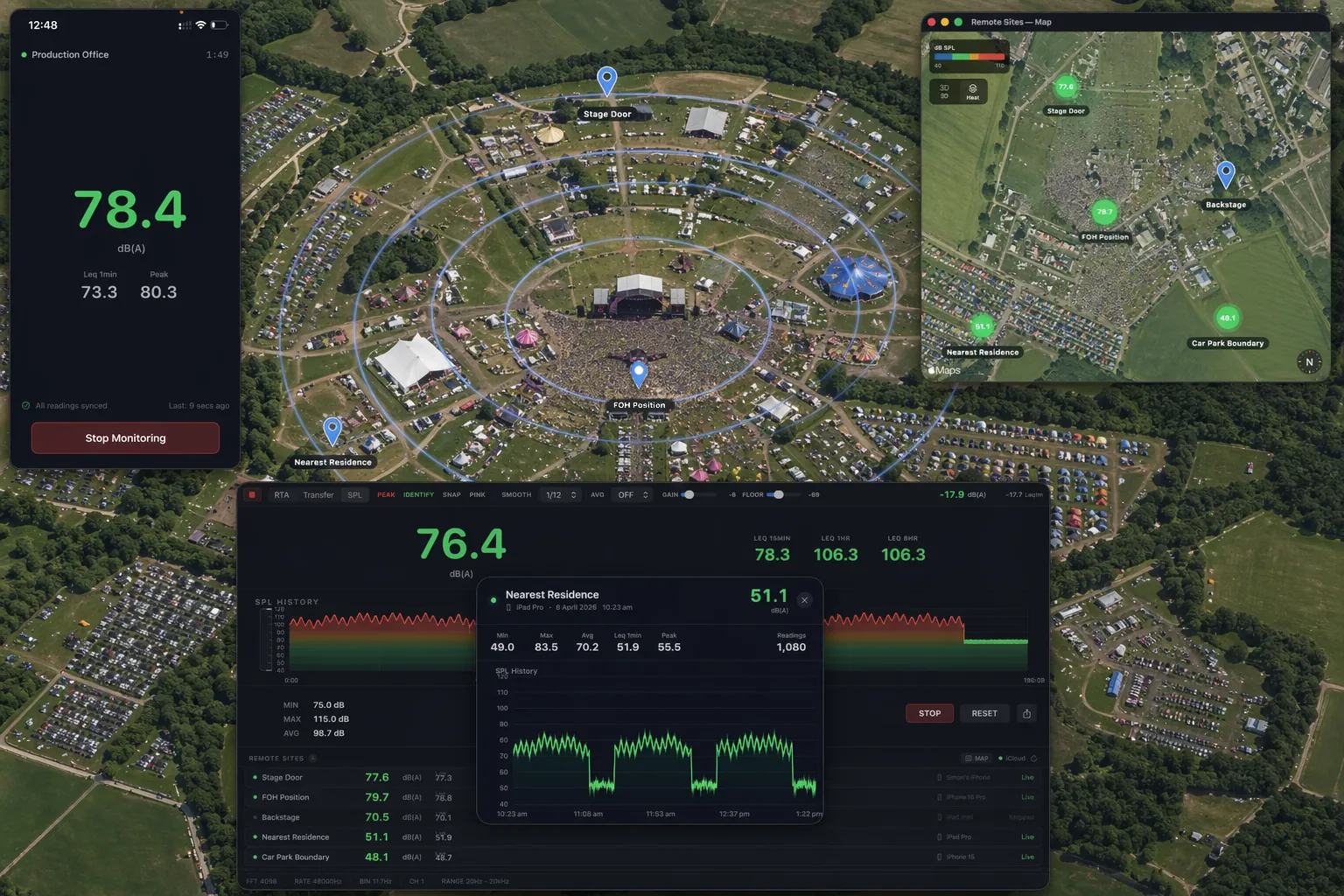
Turn any iPhone into a wireless analysis station — capturing full RTA spectrum and SPL at every site. Deploy devices around the venue and watch every site's live spectrum, levels, and history on your Mac. Satellite map view, heat map propagation, per-site graphs. All synced via iCloud.

Get Spektral for Mac £29.99

One-time purchase. Free updates. No subscription, ever.

Professional analysis, beautifully presented.

From system tuning to regulatory compliance — Spektral handles it all.

Multi-Position Capture & Delay Alignment

Capture transfer function measurements at multiple positions with quality scoring and weighted averaging. Use the Delay Alignment wizard to measure relative delays between your main PA and delay speakers — with temperature-compensated distance calculations, polarity detection, and sample-accurate timing for 48k and 96k. Auto-EQ recommends up to 6 musical parametric corrections.

Transfer Function with Auto-EQ suggestions

Environmental Noise Compliance

Monitor sound levels at your source. Track Leq over 15 minutes, 1 hour, and 8 hours with A/C/Z frequency weighting. Color-coded VU meter and time-history graph show at-a-glance compliance with noise limits.

SPL Monitor with time-history graph

See the room, not just the response

The impulse response view shows you exactly what your measurement sees. Switch to ETC (log dB) and reflections cascade clearly against the noise floor — each one auto-labelled with its arrival time, distance, and level. Turn on comb prediction and Spektral overlays the predicted notch frequencies straight onto your magnitude trace, so that dip at 179 Hz is revealed as the wall behind your mic. The delay finder now locks onto the direct sound even when a reflection is louder — and when you need to, dial it in by hand with sub-sample precision.

Impulse response view with ETC display, labelled reflections, and comb-filter prediction overlay

RT60 — reverberation time

Measure decay across octave bands from 125 Hz to 4 kHz, with T20, T30, and EDT side by side, a live decay curve, and an R² goodness-of-fit so you can trust every reading. For room tuning, acoustic-treatment verification, and handover documentation — pop a balloon or run interrupted noise and read the room.

RT60 reverberation-time measurement with per-band decay and T20/T30/EDT results

STIPA — speech intelligibility

Speech Transmission Index to IEC 60268-16, with a clear Bad–Excellent rating and a full per-band modulation-transfer and signal-to-noise breakdown. The test signal is built in — ideal for PA, voice-alarm, and EN 54 intelligibility sign-off without carrying extra kit.

STIPA speech intelligibility measurement showing STI score and per-band MTF

Professional Reporting

Generate compliance reports for regulatory authorities. PDF export includes event metadata, time-history graphs, session statistics, and equipment details. Everything you need to show you stayed within the limits.

Professional PDF compliance report

Full RTA + SPL at every site.
Zero extra hardware.

Drop iPhones at the stage door, nearest residence, FOH, backstage — each captures complete RTA spectrum and SPL, synced back to your Mac every 10 seconds via iCloud. No servers, no subscriptions.

Live dashboard

Monitor up to five remote sites from a single screen. Each site shows live spectrum, SPL, Leq, peak levels, and connection status. Click any site to see its full RTA and SPL history.

Remote monitoring dashboard with five sites showing live SPL and spectrum data

Per-site history

Drill into any monitoring point to see its complete RTA and SPL time-history. Track how spectrum and noise levels changed through sets and changeovers. Min, max, average, Leq — all at a glance.

Remote site detail view showing SPL and spectrum history

Satellite map with heat propagation

See your sites on a satellite map with SPL-coloured markers. Heat map overlay models sound propagation — giving you a visual sense of noise spread across the site.

Satellite map view with SPL-coloured site annotations and heat map

Any iPhone becomes an analysis station

Open Spektral on an iPhone, name your location, and hit Start. The device captures full RTA spectrum and SPL continuously and syncs to your Mac via iCloud.

iPhone running as a remote RTA + SPL analysis station

Remote Monitoring Add-on

£19.99

One-time in-app purchase in the macOS app · Automatically unlocks on all your iPhones

Full RTA spectrum + SPL at every site
Satellite map with heat propagation
Per-site spectrum & SPL history graphs
iPhone as wireless analysis station
iCloud sync — no servers, no accounts
PDF compliance reports

On every screen you work with.

Native on Mac, iPad, and iPhone. Same precision analysis — optimised for each device.

Spektral running on iPad showing real-time audio analysis

iPad

Full-screen analysis with touch gestures. Pinch to zoom frequency and dB axes. The perfect field companion.

Spektral running on iPhone showing real-time audio analysis

iPhone

Quick checks in your pocket. Walk the room with a measurement mic and see feedback frequencies instantly.

One universal app for iPhone and iPad — buy once, use on both. £9.99 one-time purchase.

Spektral /ˈspɛk.trəl/ adjective & noun
  1. Of or relating to the complete analysis of sound — its frequency, level, and behaviour over time.
  2. A professional audio measurement platform encompassing real-time spectral analysis (RTA), sound pressure level (SPL) metering, and environmental noise monitoring.
  3. informal The tool you reach for before you reach for the EQ.

Origin: 2026, Devon, England. From Latin spectrum ("appearance, image") + the conviction that sound engineers deserve better software.

Precision tools, zero bloat.

Spektral is a focused, native app for macOS and iOS — no Electron, no subscriptions, and no internet connection required for core analysis features. Remote Monitoring uses iCloud to sync data between your devices. It launches instantly and uses minimal system resources.

  • Smoothing control 1/1 to 1/48 octave fractional smoothing
  • Temporal averaging Exponential moving average with adjustable weighting
  • Peak hold Track maximum levels with smooth decay — double-click to reset
  • Zoomable frequency and dB axes Pinch to zoom, drag to pan — on Mac or with touch gestures on iOS
  • Keyboard-driven workflow (macOS) Every feature has a shortcut — Space, P, R, S, A, T, F, C, N
  • Sub-bin frequency accuracy Parabolic interpolation for precise readings between FFT bins
  • SPL calibration Microphone calibration via reference meter or calibrator for absolute SPL measurements
  • Frequency weighting (A/C/Z) Weighting curves based on IEC 61672 methodology for environmental noise monitoring
  • Time weighting (Slow/Fast/Impulse) IEC 61672 time constants for different measurement scenarios

System Requirements

  • macOS 14.0 Sonoma or later (Apple Silicon or Intel)
  • iOS 17.0 or later (iPhone and iPad)
  • Audio input device (built-in or external)
  • Microphone permission required

Technical Specifications

  • 4096-point FFT (11.72Hz bin resolution)
  • 48kHz sample rate
  • 20Hz – 20kHz logarithmic frequency scale
  • 60fps rendering via Metal-backed Canvas
  • Native SwiftUI on macOS and iOS — no Electron
  • Apple Accelerate framework (vDSP)

Questions

Before you buy.

Will Spektral run on my Mac?

Spektral runs on macOS 14.0 (Sonoma) and later, on both Apple Silicon and Intel Macs. It’s built natively with SwiftUI and Apple’s Accelerate framework — even older MacBooks handle 4096-point FFT comfortably at 60fps. No Electron, no bloat.

Do I need a calibrated measurement microphone?

For absolute SPL accuracy, yes — Spektral supports calibration against any reference meter or calibrator. For RTA, spectrogram, and feedback identification, a measurement mic is recommended but not strictly required. The built-in mic on your Mac or iPhone is fine for quick checks.

Is there a free trial?

The App Store doesn’t offer trials for paid apps, but every purchase is covered by Apple’s refund policy. If Spektral isn’t the right fit, request a refund through your Apple account — no questions asked, no negotiation with us.

One-time purchase or subscription?

One-time purchase. No subscription, no account required, no ads, no upsells in the app. You pay once and own it. All updates are free for the lifetime of the app.

What does the Remote Monitoring add-on actually do?

Remote Monitoring (£19.99 one-time in-app purchase on Mac) turns any iPhone you own into a wireless analysis station — capturing full RTA spectrum and SPL at every site. Drop phones at the stage door, nearest residence, FOH — anywhere you need ears. Every site’s spectrum, SPL, Leq, and peak appears on your Mac dashboard, with satellite-map heat propagation and per-site history graphs. Data is captured continuously on each iPhone and synced to your Mac every 10 seconds via iCloud — no servers, no accounts, no subscriptions.

How does Spektral compare to the big professional analysers?

Spektral covers the workflow most live sound engineers actually need day to day: RTA, spectrogram, transfer function with H1, coherence and phase, impulse response, multi-position averaging, auto-EQ suggestions, delay alignment, RT60 reverberation time, STIPA speech intelligibility, SPL with A/C/Z weighting, and PDF reporting. It’s native to Apple Silicon, runs offline for core analysis, looks like Apple shipped it — and you own it forever for £29.99 instead of paying yearly.

Can I use it on both my Mac and iPhone?

They’re two separate apps on the App Store: Spektral for macOS (£29.99) and Spektral Mobile, a universal app for iPhone and iPad (£9.99, buy once for both). Most engineers use the Mac app at FOH and Spektral Mobile to walk the room. The Remote Monitoring add-on (bought once on Mac) automatically unlocks Spektral Mobile as a wireless RTA + SPL station on every iPhone you sign in on.

Does it need an internet connection?

No. Core analysis — RTA, spectrogram, transfer function, SPL, calibration, PDF reports — all runs offline. Only Remote Monitoring uses iCloud to sync between your devices, and even then there’s no Spektral server in the loop — just your own iCloud account.

Pricing

Industry-grade analysis.
App Store pricing.

Buy once. Own it forever. Free updates. No subscriptions, no account, no ads. Backed by Apple’s standard refund policy — if it’s not for you, get your money back.

macOS £29.99 Download on the Mac App Store
iOS · Spektral Mobile £9.99 Download on the App Store

One-time purchase No subscription Free updates No account required

Get Spektral